
What if the problem with your website isn’t how it looks, but one frustrating step that stops visitors from finding what they need? Website user experience optimization starts by uncovering points of friction, not by choosing a new colour palette or rushing into a redesign.
If visitors leave without completing important tasks, you’re right to look for answers. Analytics can show where people drop off, but rarely explain why they struggle. And when redesign ideas are based on opinion alone, it’s difficult to know which change deserves attention first.
This practical guide shows you how to assess what makes a good website experience, find friction through analytics, observation and user feedback, then prioritise fixes based on evidence. You’ll also learn how to measure whether each improvement makes key tasks easier. From mobile usability and accessibility to site performance and clear navigation, we’ll walk through a repeatable process for improving your website with confidence.
Key Takeaways
- Website UX is about helping visitors complete important tasks, not just making pages look attractive.
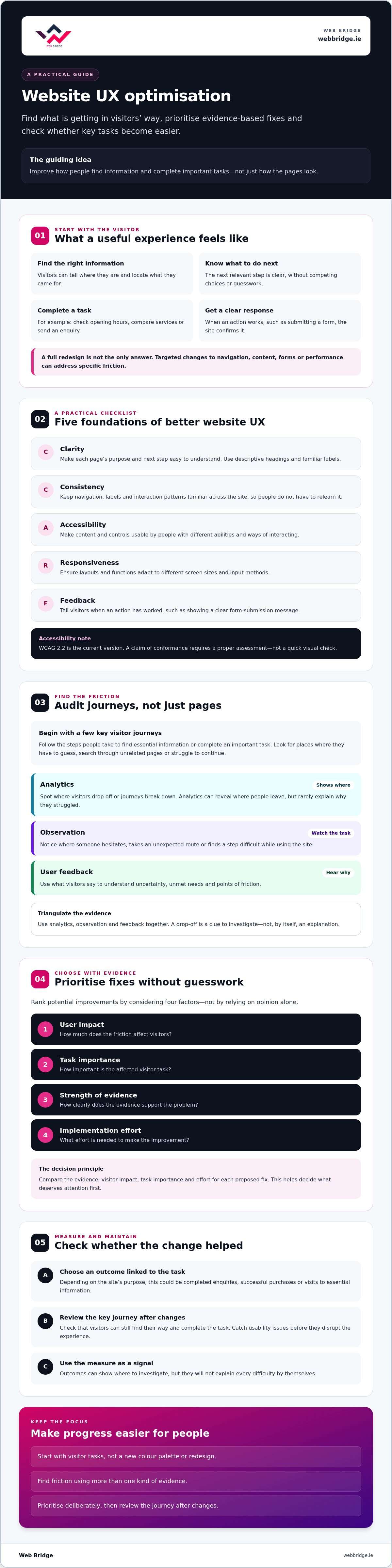
- Use clarity, consistency, accessibility, responsiveness and useful feedback as a practical checklist for website user experience optimization.
- Begin your audit with a few key visitor journeys, then use evidence to identify where people encounter friction.
- Rank potential fixes by user impact, task importance, strength of evidence and implementation effort, rather than relying on opinions.
- Review key journeys after website changes to catch usability issues before they disrupt the experience.
What website user experience optimization means for your visitors
A visually attractive website can still leave visitors unsure where to go or what to do next. If opening hours are hard to find, service details are unclear or an enquiry form is difficult to complete, polished visuals won’t remove the friction.
Website user experience optimization is the process of making it easier for people to find information and complete relevant tasks on your website. It’s not the same as a full redesign. A redesign changes the site’s overall structure or appearance. UX optimization can involve targeted improvements to navigation, page content, forms or performance.
Visual design still matters. Clear layouts, readable text and well-placed buttons help visitors understand a page, while usability, accessibility, content clarity and performance all shape how it feels to use. The core principles of user experience design include areas such as information architecture, usability and accessibility. Together, these elements help a site work for people with different needs, devices and levels of familiarity.
What makes a website experience useful and easy to navigate?
A useful experience starts with a clear structure. Visitors should be able to tell where they are, find the information they came for and see what they can do next. Consider common tasks: checking opening hours, comparing services or submitting an enquiry. If someone has to guess which menu label to choose or search through unrelated pages, the journey is creating unnecessary effort.
Use familiar, consistent labels across the site. Keep navigation visible and organise pages around what visitors are looking for, not just how the business is structured internally. Break content into descriptive headings and concise paragraphs. Clear calls to action can then guide visitors towards the next relevant step without competing for attention.
How does website UX affect business outcomes?
When key journeys are straightforward, visitors have a better chance of finding the information they need and completing an intended action, such as comparing an offer or sending an enquiry. A confusing form or hard-to-find contact details can interrupt that journey, even if the site attracts plenty of traffic.
Measure outcomes that relate to visitor needs, not page views alone. Depending on your website’s purpose, useful indicators could include completed enquiries, successful purchases or visits to essential information. These measures won’t explain every difficulty by themselves, but they can show where to investigate. The aim is a site that helps people make progress, not simply one that keeps them clicking.
The core principles behind effective website user experience optimization
Good UX starts with visitors: who they are, what they came to do and what might get in their way. The term user experience was coined by Don Norman, and it covers more than how a page looks. For a website, that means considering the whole journey, from finding a page to completing a task and understanding what happens next.
Use this checklist to guide website user experience optimization:
- Clarity: Make the purpose of each page and the next step easy to understand.
- Consistency: Use familiar labels, navigation and interaction patterns throughout the site.
- Accessibility: Make content and controls usable by people with different abilities and ways of interacting.
- Responsiveness: Ensure layouts and functions adapt to different screen sizes and input methods.
- Feedback: Confirm when an action has worked, such as showing a clear message after a form is submitted.
Accessible interactions help more people use your website with confidence. Treat accessibility as part of the experience from the start, rather than a final check after design and development.
How do clarity and consistency reduce user effort?
Help visitors scan before they commit to reading. Descriptive headings should explain what a section contains, while familiar labels such as “Contact us” are easier to interpret than internal business jargon. Use the same navigation terms and button language across pages, and keep page patterns predictable so people don’t have to relearn how the site works. Avoid ambiguous links such as “Click here” and competing calls to action that make the next step unclear.
Why do accessibility, mobile usability and performance matter?
The Web Content Accessibility Guidelines (WCAG) provide a recognised reference for accessible content. WCAG 2.2 is the current version, but a claim of conformance requires a proper assessment, not a quick visual check. Review text contrast, keyboard access, visible focus, form labels and meaningful alternative text for images.
Design for smaller screens, then test key tasks across different screen sizes and input methods, including touch and keyboard. Check that controls are easy to use, content remains readable and no essential action disappears or becomes awkward. Core Web Vitals offer performance signals, including how quickly main content appears and how responsive interactions feel. They can highlight technical friction, but they aren’t a complete measure of UX. Clear content and accessible journeys matter too.
Once visitor needs are clear, professional web design can help put considered improvements into practice. For businesses in Dublin, Web Bridge creates custom, responsive websites with a focus on user experience and conversion optimization.
How to audit your website and find the biggest user experience problems
A useful audit doesn’t start by reviewing every page. Start with a small set of important visitor tasks, such as finding a product, booking an appointment or submitting a contact form. Then follow each journey as a visitor would, noting where the route feels unclear, slow or difficult to complete. Consider how each page helps people move towards their goal. Web Bridge’s web design services can help put improvements into practice once visitor needs are clear.
Work through the audit in sequence:
- Define goals: Choose the visitor tasks that matter most to your organisation.
- Inspect journeys: Follow each task on desktop and mobile, noting the pages and actions involved.
- Review evidence: Compare analytics and search data with direct observation and user feedback.
- Record friction: Describe the obstacle, where it occurs and which task it affects.
- Prioritise: Assess the issue’s likely impact and how confident you are in the evidence.
Which website data can reveal friction in a user journey?
In Google Analytics 4 (GA4), examine relevant page paths and engagement patterns around your selected tasks. A pattern, such as visitors leaving after reaching a particular step, can tell you where to investigate. It can’t prove why they left. Google Search Console adds context by showing which queries bring people to particular landing pages. If visitors arrive expecting one answer but find different content, the mismatch may point to a clarity or structure issue.
Session recordings and heatmaps can help you observe how people interact with pages, but use them only with an appropriate privacy approach and a clear purpose. These tools complement, rather than replace, analytics and user conversations.
How can you gather useful feedback from real users?
Ask someone to complete a specific task without coaching them through it. Observe where they pause, take an unexpected route or misread an instruction. Then ask neutral questions such as, “What did you expect to happen here?” Avoid prompts that suggest the answer you want to hear.
Keep a simple record for every finding:
- Evidence: What did you observe or what pattern appeared in the data?
- Affected task: What was the visitor trying to do?
- Likely impact: How might the friction prevent progress?
- Confidence: Is the finding repeated or based on a single observation?
Evidence shows what happened; a hypothesis proposes why it happened. For example, a form abandonment pattern is evidence. The idea that unclear field labels caused it is a hypothesis to test. Keeping them separate makes website user experience optimization more disciplined and helps you choose fixes based on what you know, not assumption.
How to prioritise, test and improve website UX without guesswork
An audit can uncover more issues than you can tackle at once. The next step is to decide which ones matter most, then make changes you can evaluate. Effective website user experience optimization doesn’t automatically mean rebuilding the entire site. A confusing label, unclear page content or awkward navigation path may be fixable without replacing the underlying design.
How do you choose which UX problem to fix first?
Compare each issue using four factors: its impact on visitors, the importance of the task affected, the strength of your evidence and the effort needed to implement a fix. A problem that blocks an important enquiry deserves more attention than a minor visual inconsistency, particularly if you’ve observed it repeatedly.
Separate quick changes, such as rewriting a button label or clarifying page content, from changes that need development work. Record why each item has its priority, so stakeholders can review the reasoning and adjust it if new evidence emerges. This keeps decisions grounded in visitor needs rather than whoever has the strongest design preference.
How can you tell whether a UX change worked?
Set a clear hypothesis before making a change. For example: “If we make the next step clearer, more visitors will complete this task.” Name the task and select a relevant measure, such as successful form submissions or fewer errors during checkout. Check the existing result as a baseline, so you have something meaningful to compare against.
Make one meaningful change at a time where practical. Compare like-for-like periods or use a suitable test, and note other factors that could affect the result, such as a campaign or a change to the page content. A/B testing can help compare alternatives, but only when you have enough traffic and can run the test under conditions that support a reliable comparison. There’s no universal sample size or success threshold, so avoid drawing firm conclusions from limited or uneven data.
Numbers don’t tell the whole story. Pair quantitative measures with user feedback or direct observation. If a change improves a metric but people still hesitate or misunderstand the page, investigate further. Keep the change, refine it or roll it back based on the combined evidence, and document what you learned for the next improvement.
Once you’ve identified the changes your site needs, explore Web Bridge’s web design services as a possible route to putting them into practice. The agency works with businesses in Dublin as well as elsewhere in Ireland.
How to maintain a better website user experience over time
A website experience can slip as the business and its site change. New content may bury key information, a platform update may affect a form, or a design change may make a familiar journey harder to follow. Build website user experience optimization into ongoing website care, rather than treating it as a one-off project.
What should a simple UX review routine include?
After a significant content, design, platform or business change, revisit the tasks visitors rely on most. Check them on common devices and browsers: can someone still find the right information, complete a form or move through a purchase without unnecessary obstacles?
Keep the routine focused:
- Retest priority journeys after material website updates.
- Review analytics and feedback for meaningful patterns, not every short-term fluctuation.
- Check for regressions, including broken links, outdated details, missing content and controls that no longer work as expected.
- Assign ownership for logging issues, recording decisions and arranging follow-up checks.
Consistent technical upkeep can help prevent avoidable faults from interrupting user tasks. If you’re reviewing a site’s technical needs, see the information on website repair and maintenance.
When is specialist website support worth considering?
Consider support if recurring technical problems disrupt essential tasks, or if user journeys remain difficult despite smaller content and navigation changes. If evidence points to a structural issue, a focused redesign may be appropriate, but rebuilding the entire site isn’t automatically the answer. Web Bridge’s custom web design services may be relevant when broader design or development work is needed, including for businesses in Dublin.
Before work begins, ask for a clear scope tied to the problems you’ve identified. It should explain which user needs the proposed changes address and how you’ll assess whether those tasks have become easier. That gives your team a shared basis for decisions and follow-up.
If you’re ready to put evidence-led improvements into practice, explore Web Bridge’s web design services and consider whether they fit the changes your site needs.
Make your next website improvement evidence-led
A better website experience doesn’t have to begin with a complete redesign. Start with the visitor tasks that matter, look for friction using data and observation, then prioritise changes according to their impact and the strength of your evidence. Test each meaningful update against a clear baseline, and revisit important journeys as your content and technology evolve.
That steady approach makes website user experience optimization a practical process, not a matter of personal preference. Small, well-chosen improvements can make it easier for visitors to find information and take the next step, while ongoing checks help you spot issues before they disrupt key tasks.
If your findings point to broader design work, Web Bridge creates custom, responsive websites for businesses in Dublin and across Ireland. Explore Web Bridge’s web design services and take the next step towards making your site easier to use.
Frequently Asked Questions
What is website user experience optimization?
Website user experience optimization is the process of making it easier for visitors to find information and complete relevant tasks on a website. It considers the whole journey, including page structure, content, navigation, accessibility and performance. The goal isn’t simply to make a site look attractive. It’s to remove avoidable obstacles so people can understand what to do next, whether they’re comparing services, making a purchase or sending an enquiry.
How do I improve my website user experience?
Start by choosing a few important tasks and checking how easily visitors can complete them. Follow each journey on mobile and desktop, then combine analytics patterns with user observation and feedback to identify friction. Fix the most important, well-evidenced problems first, such as confusing navigation or unclear form instructions. Make a measurable change, compare results with a baseline and keep reviewing key journeys as your website develops.
What are the key elements of a good website user experience?
A good website experience combines clarity, consistency, accessibility, responsiveness and useful feedback. Visitors should be able to understand page content, recognise familiar navigation and use controls on different devices. Accessible design supports people with different abilities and ways of interacting with a site. Performance matters too, but speed alone can’t make a confusing page useful. The elements work together to help people move through a journey with confidence.
How can I measure website user experience?
Measure whether visitors can complete tasks that matter, rather than relying on page views alone. Use Google Analytics 4 (GA4) to examine relevant paths and engagement, and track outcomes such as completed enquiries or purchases where appropriate. Pair these signals with observation and user feedback to understand potential causes. A change in a metric can show where to investigate, but it doesn’t prove why behaviour changed.
Does website user experience optimization require a redesign?
No. Website user experience optimization can begin with targeted changes to content, labels, navigation or forms. A full redesign may be worth considering if evidence points to deeper structural problems that smaller adjustments can’t address. For a Dublin business, Web Bridge creates custom, responsive websites, but the right approach depends on the user needs and issues you’ve identified. Define the problem and desired outcome before deciding how much of the site to change.
How often should I review my website user experience?
Review key journeys regularly and retest them after material changes to your content, design, platform or business. There’s no single review schedule that suits every site. For Dublin businesses, a practical routine is to assign someone to monitor important tasks, note broken links or outdated information, and review meaningful patterns in analytics and feedback. Regular checks can help you spot issues as the site changes.